অনুগ্রহ করে অপেক্ষা করুন। ছবি আটো ইন্সার্ট হবে।





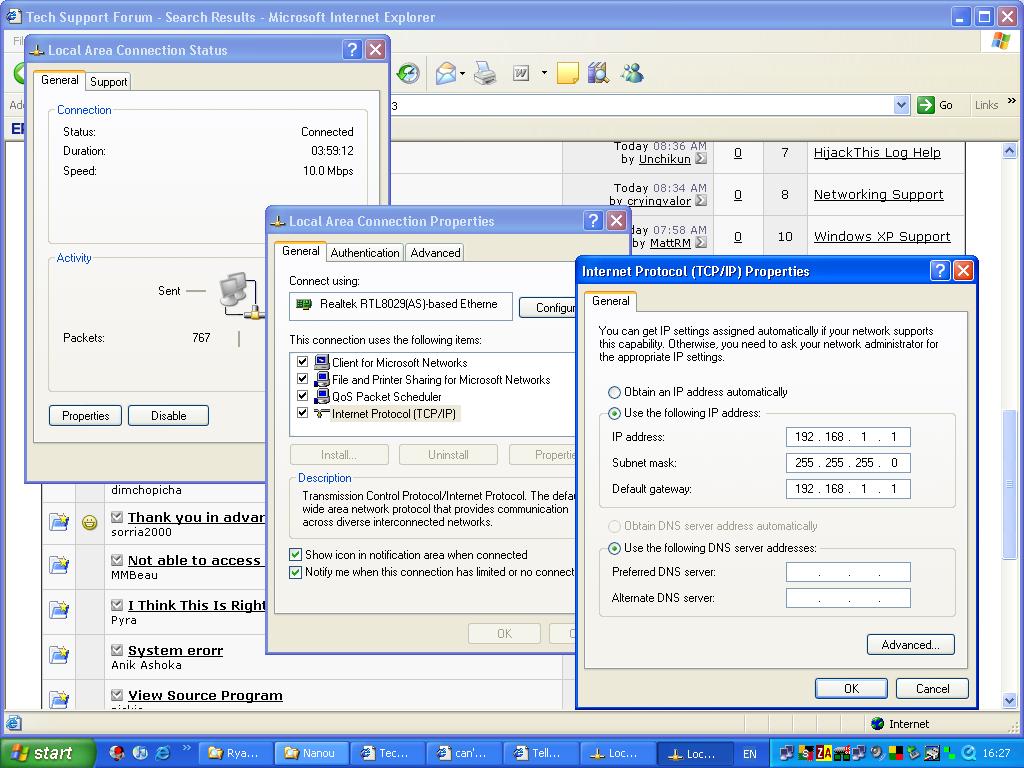
start>control panel>network connection>local area connection right click>properties>general>internet protocol(TCP/IP) click hear>properties>use the following ip address click here>example:
ip address 10.11.11.13
subnet mask 255.255.255.0
Defalt gateway 10.11.11.252
preferred DNS server 202.168.238.98
Alternet DNS server 202.168.254.4
then click ok>
step:2
start>control panel>network connection>local area connection right click>status>support>details>physical address write note book when need 3th step....
step:3
start>control panel>network connection>local area connection right click>properties>general>configure>yes>advanced>network address>value>physical address>ok.....
enjoy 2 pc internet conection but 1 pc run other pc stiop
সর্বশেষ এডিট : ২০ শে ফেব্রুয়ারি, ২০০৯ সন্ধ্যা ৭:৫৪