অনুগ্রহ করে অপেক্ষা করুন। ছবি আটো ইন্সার্ট হবে।


=DATEDIF(date1,date2,interval)
Date1 is the start date
Date2 is the end date
Interval is the type of interval you want to calculate e.g. days, months, years.
DATEDIF Intervals
d = days. Complete days between two dates.
m = months. Complete calendar months between two dates.
y = years. Complete calendar years between two dates.
yd = Complete calendar days between two dates as though the end date is in the same year as the start date.
ym = Complete calendar months between two dates as though the end date is in the same year as the start date.
md = complete calendar days between two dates as though the month and year of the end date is the same as the start date.
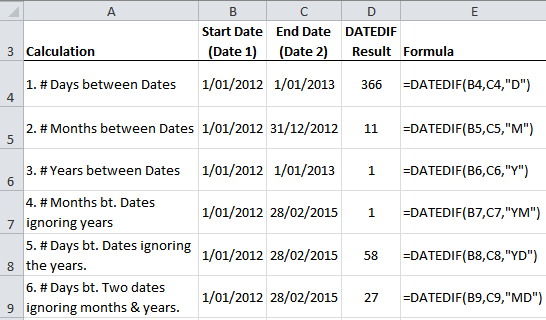
Let's take a look at some DATEDIF examples:
Excel DATEDIF Function
Note: you could achieve the same result for example 1 above with this formula:
=C4-B4
Ok, so the above are some pretty basic calculations.
Let's have some fun with DATEDIF now, and in keeping with the Queen's Silver Jubilee we'll use Her Majesty as an example.
Fun # 1:
Years since Queen Elizabeth II ascended the throne:
=DATEDIF("6/2/1952",TODAY(),"Y")
= 60
Note: in the above formula TODAY() = 6th June 2012. The TODAY() function will return today's date as per your computer clock. Also handy for report headers and the like.
সর্বশেষ এডিট : ০৬ ই মার্চ, ২০১৩ দুপুর ২:০৯